

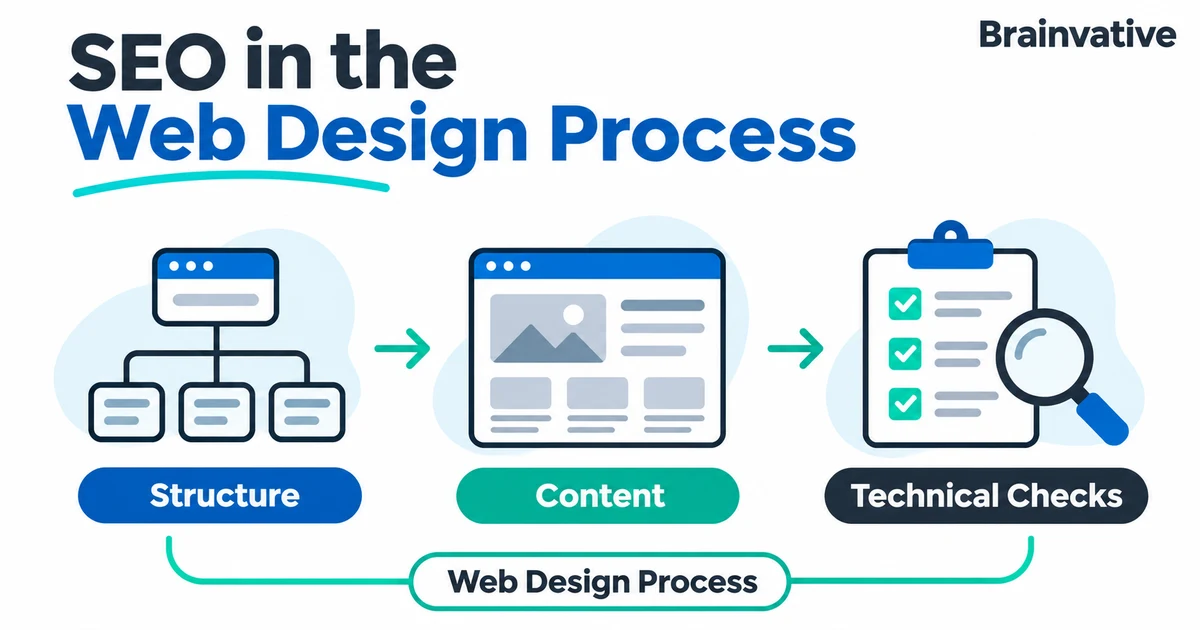

SEO belongs in the website brief, not just in a checklist after the design is approved. Page structure, navigation, content and development choices determine whether visitors can find useful information and whether search engines can access it.
Plan the page's purpose before its layout. Map visitor questions to useful pages, preserve working URLs during a redesign, build accessible navigation and test the published result. A visually polished website still needs relevant content and sound technical foundations; neither design nor an SEO plugin guarantees rankings.
1. Start with audience questions and existing evidence
Define the audience, the service or product they need and the action each page should support. A visitor comparing suppliers needs different information from someone seeking an installation manual. Use that distinction to plan content rather than creating a separate page for every slight keyword variation.
For an existing website, review its landing pages, search queries, enquiries and useful backlinks before changing the structure. Keep a record of URLs and content that already serve a purpose. For a new website, document customer questions and the evidence available to answer them: service scope, original project images, confirmed terms and genuine feedback.
Turn research into a page brief with an audience, primary question, supporting information and next action. Our SEO audit guide explains why understanding the actual problem is more useful than applying the same checklist to every website.
2. Design a logical page structure and crawlable navigation
Group pages so visitors can move from a broad category to a specific service, supporting explanation or enquiry. Keep important pages reachable through relevant links rather than relying on an XML sitemap alone. Use clear names that make sense outside the design team's internal terminology.
Google's link guidance recommends anchor elements with an href that resolves to a real URL. A clickable graphic or script-only action is not automatically an equivalent crawlable link. Use descriptive link text and connect related content where it genuinely helps the reader.
Illustrative planning example: an interior-fit-out company might use a services overview, a detailed office-fit-out page, relevant project examples and a contact route. The service page can answer scope and process questions, while the project pages show actual work. That is a clearer purpose for each page than repeating one paragraph across many near-identical pages.
3. Build the layout around useful, verifiable content
Prepare enough real content to test the design: long service names, realistic paragraphs, meaningful images and genuine calls to action. Placeholder text can hide problems such as headings that wrap badly or a layout that leaves no room for important qualifications.
- Explain the offer: identify what is included, who it suits and what needs a separate discussion.
- Show evidence: use authorised project work and accurate testimonials instead of invented statistics or decorative trust badges.
- Organise the answer: use a clear main heading and descriptive section headings that follow the content hierarchy.
- Make actions understandable: distinguish requesting a quote from buying, booking or downloading something.
- Keep essential text readable: do not place the only explanation of a service inside a promotional image.
Give meaningful images appropriate alternative text based on their purpose. Avoid stuffing location and service keywords into every description. Review the content and design together: neither should force the other into an unusable template.
4. Understand what mobile-first indexing actually means
Google uses the mobile version of a site's content for indexing and ranking. It is not simply a promise to rank a mobile-friendly page above its competitors. Google's mobile-first indexing guidance recommends equivalent primary content, metadata and structured data across mobile and desktop.
A compact mobile layout can use accordions or tabs without removing important information. Avoid making essential content load only after a user action that Google may not perform. Check that images and other required resources are accessible, and that mobile robots directives do not accidentally differ from desktop.
Test with the actual page copy on a narrow screen. Check navigation, text size, touch targets, keyboard focus and form errors. Make sure an enquiry button or sticky widget does not cover the content someone needs to read.
5. Include performance in template acceptance checks
Review the main image, font loading, scripts and layout stability while the template is still being developed. A heavy shared component can affect many pages, so test representative templates rather than only the homepage.
Google says its ranking systems use Core Web Vitals, but good scores do not guarantee top positions. Its page experience guidance also cautions against treating a perfect score as the goal. Do not claim that a lower bounce rate alone proves a ranking improvement.
Use our Core Web Vitals guide to interpret LCP, INP and CLS, and the website speed and performance guide for practical diagnosis. Test real interactions as well as initial loading, especially menus and forms.
6. Specify metadata, canonical URLs and indexing rules
Give each important page a descriptive title that matches its purpose. Avoid repeated boilerplate and keyword lists. Google may generate a different title link using page content and other sources; the title tag is an input, not a guaranteed display instruction. See Google's title-link guidance.
Write a useful, page-specific meta description. Google primarily creates snippets from page content and may use the description when it better summarises the page. Do not design around a promise that one fixed sentence or character count will always appear. Google's snippet guidance explains this behaviour.
Decide the preferred URL for duplicate or very similar versions. Keep canonical annotations, internal links and sitemap URLs consistent. Canonicalisation is a signal, not a guarantee that Google will choose the requested URL; see the canonical URL documentation. Do not point unrelated service pages at the homepage as a shortcut.
Check launch settings carefully. A staging noindex directive must not accidentally remain on a public page intended for search. Robots.txt controls crawling and is not a reliable substitute for noindex: Google must be able to access a page to see its noindex rule. See Google's noindex guidance. Protect private staging content with access controls rather than treating search directives as security.
7. Add appropriate structured data and validate it
Choose markup that accurately describes the page and its visible information. An article, product or breadcrumb may have different requirements. Do not add invented ratings, prices or business details merely to fill fields.
Google generally recommends JSON-LD when the setup supports it. Follow the requirements for the specific supported search feature and use the Rich Results Test to check eligibility for that feature. Valid markup does not guarantee a rich result. Google's structured data introduction links to the current documentation and testing tools. Check the rendered page as well as the template code.
8. Preserve useful URLs during a redesign
A visual redesign does not require changing every URL. Keep existing addresses where the page purpose remains the same. If changes are necessary, document the old-to-new mapping before launch, use suitable permanent redirects to relevant replacements and update internal links and sitemap entries.
Avoid sending every removed page to the homepage. Where content is genuinely gone without an equivalent replacement, an appropriate not-found or gone response may be more accurate. Google's site-move guidance covers URL mapping, redirects and monitoring. Treat a migration as a separate release risk, not an incidental design change.
A practical SEO handover checklist
| Stage | Deliverable | Acceptance check |
|---|---|---|
| Planning | Page inventory and content briefs. | Each page has a useful purpose; existing URLs are accounted for. |
| Design | Desktop and mobile layouts with real content. | Important information and actions remain readable and usable. |
| Development | Templates, navigation and metadata controls. | Links resolve; canonicals, robots directives and headings are correct. |
| Pre-launch | Test record and rollback plan. | Images, forms, redirects, tracking and relevant schema are checked. |
| After launch | Monitoring and issue ownership. | Unexpected errors are investigated; search and enquiry data are reviewed separately. |
Monitor the published website, not just the mock-up
Check important URLs after deployment and retain the before-launch records. Review unexpected status codes, crawl access and rendering problems. Use our Search Console troubleshooting guide to interpret search reports rather than assuming that a successful launch means immediate indexing.
Record real enquiry events separately from button clicks and review whether the measurement is working. Search visibility, website usability and business outcomes answer different questions. Agree who maintains the content and templates so later changes do not undo the original checks.
Brainvative's website design and development services and SEO services can be planned together around these deliverables. A useful brief includes the existing website, pages to preserve, customer questions and evidence available, so the project has a clear scope and a testable launch plan.
