

.jpg)

A useful Google Business Profile helps customers check your services, location, opening hours and contact options before they decide what to do next. This checklist is for reviewing an existing profile or preparing an eligible business for verification, without relying on ranking shortcuts.
Start with accuracy, then check the customer journey. A complete profile does not guarantee a top-three Maps position, enquiries or revenue. Record what you change and assess results over a defined period.
For the wider strategy behind these checks, read how Google Business Profile supports local SEO. Here, the focus is on actions you can check off and maintain.
Google Business Profile optimization checklist: quick audit
Start with the high-priority checks below, then work through the detailed sections. Record each item as done, needs attention or not applicable in your maintenance log. Priority and review frequency are our suggested workflow, not a Google ranking score or required schedule.
| Check | Completion test | Priority | Review |
|---|---|---|---|
| Eligibility and duplicates | Confirm the business qualifies and search for an existing listing before creating one. | High | Before setup or relocation |
| Ownership and verification | The business controls access and has completed the verification Google requests. | High | At setup or access changes |
| Name and categories | Name matches real-world branding; categories describe actual business activities. | High | When business activities change |
| Address or service area | Public location and customer-visit arrangements accurately reflect how the business operates. | High | At relocation or coverage changes |
| Normal and special hours | Check each day and upcoming holiday against actual opening arrangements. | High | Before holidays and schedule changes |
| Description and services | Information describes current services without keyword stuffing or unsupported claims. | Medium | When the offering changes |
| Website and booking links | Open on mobile and complete an authorised test of the enquiry or booking journey. | High | Monthly and after website changes |
| Photos | Images show the real, current business and help customers recognise it. | Medium | When premises or work changes |
| Review requests and replies | Requests invite honest experiences without incentives or screening; replies protect privacy. | High | During ongoing customer service |
| Posts and offers | Dates, claims and destination links are correct; expired offers are addressed. | Medium | Before publishing and at expiry |
| Phone and contact options | The displayed contact routes work and someone is responsible for enquiries. | High | Monthly and after contact changes |
| Customer questions | Your website answers recurring questions about access, appointments and services. | Medium | When recurring questions emerge |
| Performance measurement | Compare matching date ranges; separate profile interactions from confirmed enquiries. | Medium | Monthly |
| Change log | Record the date, issue, action and owner; do not assume an edit caused a ranking change. | Medium | After each change |
See the public-profile checksRead the detailed checklist
Ranking factors versus routine maintenance
Google describes local results using relevance, distance and prominence. Accurate profile details help explain the business, but completing this table is not a guarantee of a top-three position. Checking a phone number, replacing an old photo or removing an expired offer helps customers; do not treat each task as a separate confirmed ranking factor. Read Google's explanation of local ranking.
Check what a customer actually sees
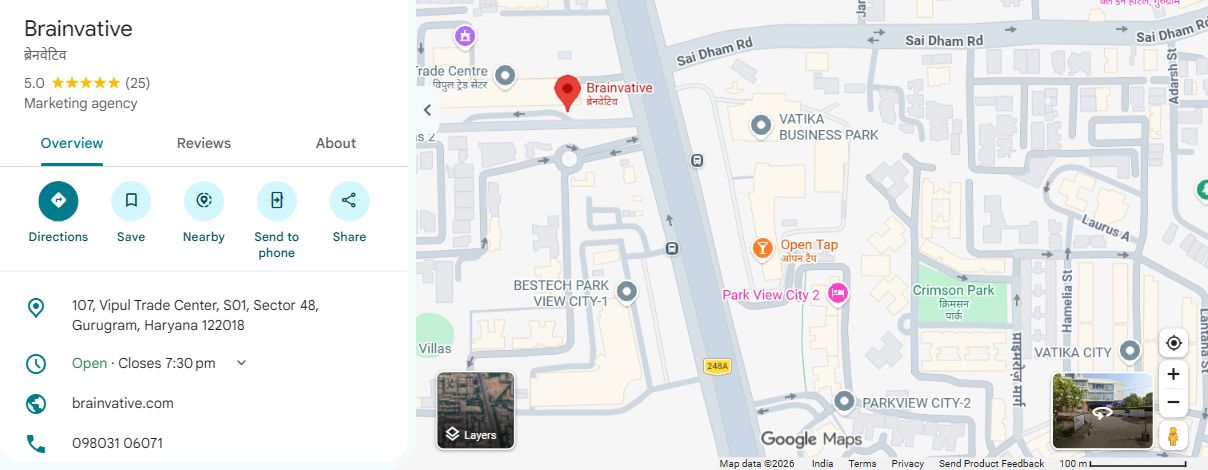
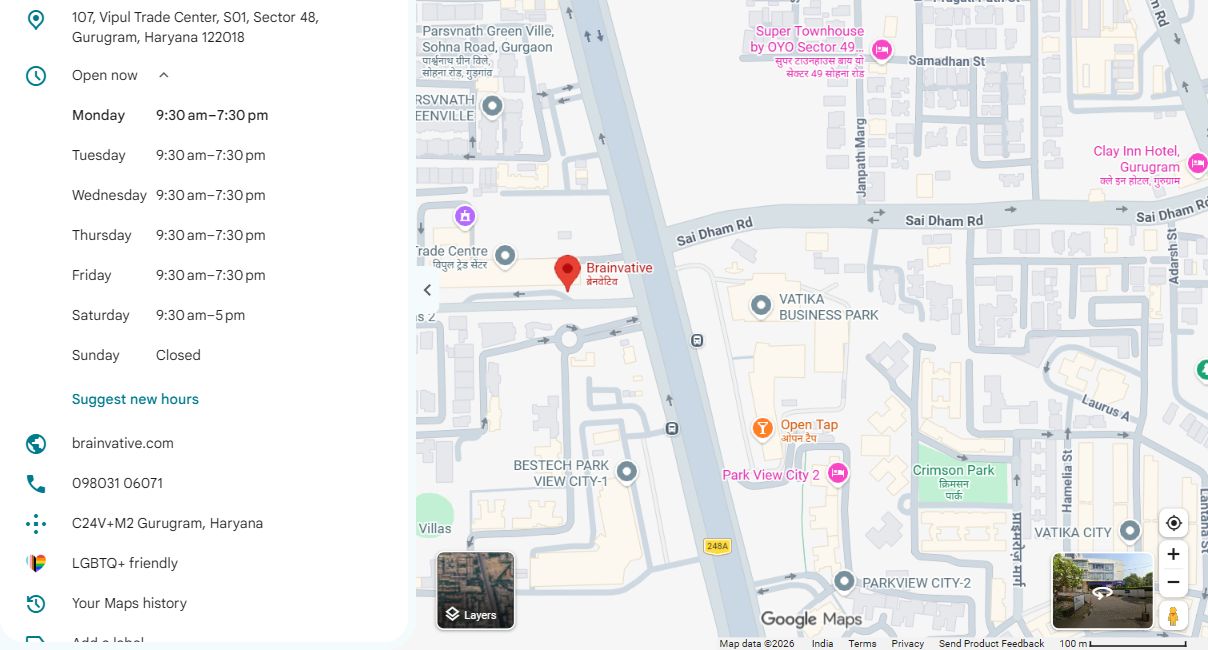
These are genuine screenshots of Brainvative's public Google Maps listing, captured on 16 November 2026. They illustrate customer-facing checks, not owner-dashboard controls or evidence that an optimization caused results. Google interfaces and business details can change.
- Search for your business in Google Maps and open the correct listing. Compare the business name, category and address with your real business details.
- Open the website link on your phone. Check the destination and enquiry journey; do not assume a visible button proves the form works.
- Check the displayed telephone number and confirm the team responsible can receive enquiries.
- Expand the hours row to inspect the full week, including closed days. Compare it with the business's actual schedule.
- Before holidays, check the special-hours settings available in the owner's profile. The public weekly-hours screenshot below does not show those settings.
- If a correction is needed, use the authorized business account to edit the profile, then recheck the public result after the change is processed.
1. Confirm eligibility before creating a profile
Check that the business meets Google's eligibility rules: generally, it must receive customers at a physical location or travel to them. An online-only business is not eligible simply because it serves a city. Search for an existing listing before creating another. Follow Google's business representation guidelines.
2. Check ownership and complete verification
Identify who controls the profile and use the available ownership or verification process. Google selects the verification methods; you cannot assume an SMS code or postcard will be offered. More than one method may be required. Keep verification codes private and follow the instructions shown for that business. See Google's verification guidance.
3. Use the real business name and relevant categories
Match the business name used in real-world branding. Do not add promotional phrases or location keywords just to target searches. Select the primary category that best describes the core business and only relevant additional categories. There is no target quota of three to five secondary categories: Google advises using the fewest needed.
4. Review the address, service area and hours
Check the map location, phone number, normal hours and holiday hours. If customers do not visit your address, follow the service-area business rules rather than displaying a location as a storefront. Describe where you actually operate, not every city you hope to rank in.
Practical check: ask a colleague unfamiliar with the listing to find your entrance or understand how to arrange a visit. Correct anything that would send a customer to the wrong place or suggest you are open when you are not.
5. Write a useful description and service list
Explain the business plainly: what it does and who it serves. Keep the description relevant rather than filling it with search phrases. Where the services editor is available, list actual services with clear descriptions and accurate prices if you choose to show them. Check Google's service-editor instructions; available options can differ between profiles.
6. Test the website and booking journey
Open the linked page on a phone. Does it describe the right business and service? Can a visitor use the contact form, call button or booking process? Submit an authorised test enquiry and confirm it reaches the intended team. A working link is only the start; the destination should help the visitor complete their task.
Use our guide to incorporating SEO into web design to review the supporting website. For naming consistency in this region, see Gurgaon or Gurugram: which name should your website use?
7. Add genuine, current photographs
Choose clear photographs that help people recognise the premises, team, products or work. Replace misleading or obsolete images when the business changes. Google's photo and video guidance explains the available upload options. Treat image maintenance as customer information, not a weekly upload quota that guarantees better rankings.
8. Request honest reviews without screening customers
Invite customers to describe their genuine experience in their own words. Do not limit requests to happy customers, offer incentives, prescribe a star rating or supply keyword-filled review scripts. Google's review policies prohibit fake engagement and rating manipulation.
Respond professionally to feedback. Keep replies useful and avoid exposing order details, personal contact information or sensitive customer records. A complaint is an opportunity to resolve a real issue, not a reason to pressure someone to change their rating.
9. Publish updates when there is something useful to share
Use posts for relevant news, events or offers, with accurate dates and a working destination. Follow Google's post guidance. A convenient publishing schedule can help your team stay organised, but one or two posts a week is not a documented ranking formula. Remove or update expired offers.
10. Check the contact options actually available
Google discontinued the old Business Profile chat and call-history features on 31 July 2024. Eligible accounts may offer text-message or WhatsApp contact options instead; do not assume every profile has them. See Google's chat and call-history update. Test the displayed phone number and any enabled contact route, and assign someone to handle incoming enquiries.
11. Answer recurring questions on your website
Keep useful answers about appointments, pricing scope, access and service coverage on the relevant website page. Review questions customers actually ask by phone or email. Do not make your information strategy depend on a particular Q&A control appearing in every version of Google Search or Maps.
12. Measure interactions separately from business outcomes
Choose a date range in Business Profile performance. Available metrics vary, and the report can include organic and Google Ads activity. Website clicks, call-button clicks and direction requests are interactions, not confirmed enquiries, answered calls or visits.
- Record profile interactions with the reporting dates.
- Track completed forms, answered enquiries and bookings separately.
- Note changes to hours, advertising, services or seasonality before comparing periods.
- Keep definitions consistent; do not describe every interaction as a lead.
13. Review visibility without promising a ranking
Google describes local results in terms of relevance, distance and prominence. A business cannot pay Google for a better organic local ranking. Use Google's local ranking guidance to set expectations. One search from one device is not a complete performance assessment.
14. Keep a simple maintenance record
As an operational routine, check contact routes and recent feedback regularly, review performance monthly and update business details whenever they change. This is a suggested workflow, not a Google-mandated frequency. Record the date, issue, action and person responsible so you can distinguish completed work from assumptions.
Need help prioritising the checks? Brainvative's Local SEO and Google Profile services cover profile work, while our Gurgaon SEO services address the wider website strategy. Start with the business's real details and the customer journey, then measure the outcome.
